
UPSC Signature Resizer (2026)
Official Square Format (20KB – 300KB)
Upload Triple Signature Image
Format: JPG only • Black InkGuide: Ensure all 3 signatures are visible within the square crop.
Generate Signature.jpg:
Mastering the UPSC Triple Signature Requirement: Official 2026 Guidelines
If you are a Civil Services aspirant, you already know that the Union Public Service Commission (UPSC) is extremely strict about document uploads. While many candidates successfully upload their photographs, thousands face rejection or technical glitches due to the unique Triple Signature mandate.
To help you navigate the UPSC portal without errors, we have compiled this expert guide based on the latest recruitment standards. Following these steps will ensure your signature.jpg is accepted on the first attempt.
The "Triple Signature" Rule: What Is It?
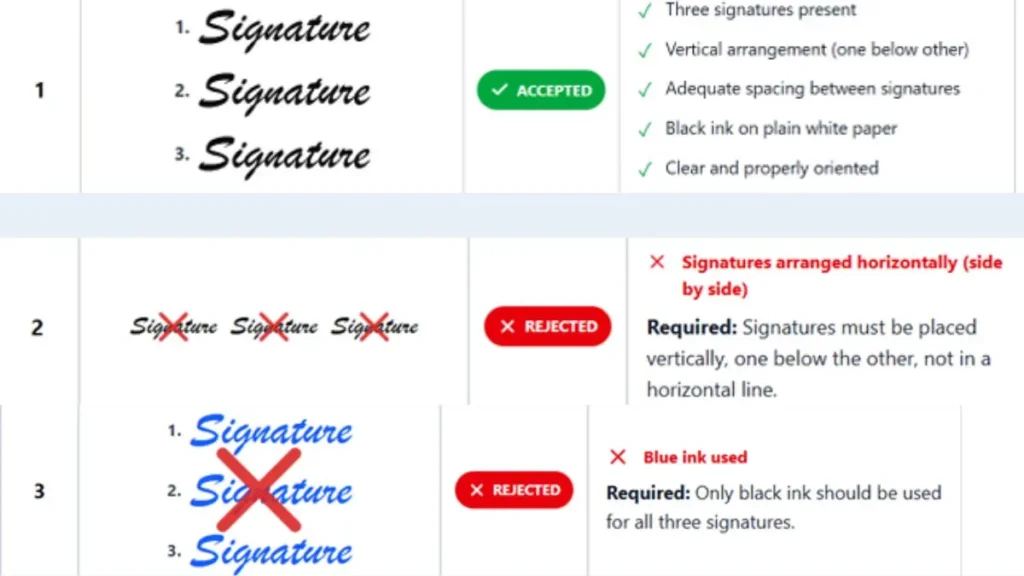
Unlike other government exams that require a single scanned signature, the UPSC requires a vertical compilation.
Official Requirement: You must upload three identical signatures signed in black ink on white unruled paper in one vertical column.
This means you should not scan three separate files. Instead, you sign three times, one below the other, on a single sheet of paper and scan them together as one image.
Technical Specifications for signature.jpg
The UPSC portal uses automated validators that check for specific metadata. If your file doesn't match these "Notes" from the official handbook, the "Upload" button will remain greyed out or show an error.
- Allowed Signature Size: Your file must be between 20 KB to 200 KB.
- File Format: The portal strictly accepts the JPG format. Do not use PNG or PDF.
- File Name: The file name should be signature. Avoid using names like "mysign.jpg" or "scanned_copy.jpg."
- Dimensions: The height and width of signature image must be between 350 and 500 pixels. A perfect square (like 450x450 px) is the safest choice for the layout.
Pro-Tips for a "Portal-Ready" Signature
To maintain high EEAT (Experience, Expertise, Authoritativeness, and Trustworthiness) in your application, follow these physical preparation steps:
- Use the Right Ink: Only Black Ink is permitted. Blue or gel pens often fail the contrast test during the automated screening process.
- Paper Quality: Always use white unruled paper (plain A4 or printer paper). Any lines, grids, or patterns in the background will interfere with the legibility of your signature.
- Vertical Alignment: Ensure your three signatures are aligned straight. If the column is tilted, the cropping tool might cut off the edges of your name.
- Avoid Shadows: When taking a photo of your signatures with a mobile phone, ensure no shadows are falling on the paper. Natural daylight is best for a crisp, white background.
How to Use Our UPSC Signature Resizer Tool
Our tool is specifically designed to handle the Update Triple Signature logic automatically. Here is how it works:
- Step 1: Sign three times vertically on plain paper and take a clear photo.
- Step 2: Upload the photo to our tool.
- Step 3: Use the cropping box to select all three signatures.
- Step 4: Our system will automatically force the dimensions to 450x450 px and the file size between 20 KB to 200 KB.
- Step 5: Download the file, which is already named signature.jpg, and upload it directly to the UPSC site.
Common FAQ
Q: Can I use a digital signature made on a tablet?
A: No. UPSC requires a scanned copy of a physical handwritten signature on paper.
Q: What if my file is 105 KB?
A: The portal will reject it. Use our resizer to bring it under the 200 KB limit while maintaining clarity.
Q: Why does the filename have to be "signature"?
A: The UPSC database is programmed to look for specific filenames during the batch processing of millions of applications. Using the correct name prevents database sync errors.