
Add Name and Date on Photo
Add required Name & DOP and compress to specific KB instantly.
Drop photo or click to browse
Applying for government jobs in India, such as SSC CGL, CHSL, MTS, or GD Constable, is a high-stakes process. While candidates spend months preparing for the syllabus, many overlook the most common “silent killer” of applications: Incorrect Photo Specifications.
If you are struggling with Photoshop or mobile apps that produce blurry results, you are in the right place. PhotoKB’s Name and Date Tool is engineered to generate a 100% compliant passport-size photo with your Name and Date of Photo (DOP) printed clearly at the bottom.
The “Why”: Understanding the SSC and NTA Mandate
The Staff Selection Commission (SSC) and National Testing Agency (NTA) have implemented strict digital document standards to prevent identity fraud and ensure candidates use recent photographs. According to the latest 2025-2026 notifications:
“The photograph must not be more than three months old from the date of publication of the Notice of Examination, and the Date on which the photograph has been taken must be clearly printed on the photograph.”
The Risks of Manual Editing
Many students attempt to add text using basic mobile apps, WhatsApp editors, or MS Paint. This often leads to:
- Low Contrast: Black text on a dark shirt becomes unreadable for the AI scanners used by SSC.
- Obstruction: Text accidentally covering the chin or chest area.
- Font Issues: Using stylish or thin fonts that appear “pixelated” when the image is compressed to under 50KB.
- Incorrect Aspect Ratio: Squashing or stretching the face to make room for the text.
PhotoKB solves this by using a standardized White Strip logic. We reserve the bottom 15-20% of the image for a solid white background, ensuring the black text is always sharp and 100% legible.
Official SSC Photo Requirements (2025-2026)
Before you use the tool, ensure your base photo meets these core criteria:
| Requirement | Specification |
| File Format | JPG / JPEG only |
| Dimensions | 3.5 cm (width) x 4.5 cm (height) |
| File Size | 20 KB to 50 KB |
| Background | Plain White or Light Blue |
| Face Coverage | Face must occupy roughly 75% of the frame |
| Spectacles | Eyes must be clearly visible (No glare or tinted glasses) |
How to Use PhotoKB’s Name and Date Tool
We have simplified the technical process into four easy steps:
Step 1: Upload Your Photo
Click our Browse File button. We recommend uploading a high-resolution original image. Our tool uses Client-Side Processing, meaning your photo is never uploaded to our server, protecting your privacy.
Step 2: Enter Your Official Name
Type your full name exactly as it appears on your Matriculation (10th) Certificate. Do not use nicknames or initials if they aren’t on your official ID.
Step 3: Select the Date of Photo (DOP)
Choose the date the photo was actually clicked. Pro Tip: Ensure this date is within 90 days of the exam notification date. If you select an older date, the portal will automatically reject your form.
Step 4: Live Preview and Download
Watch the preview update in real-time. Once the text is aligned and the quality looks crisp, click “Download Photo”. Our engine automatically compresses the final file to the 20KB – 50KB range, so it’s ready for immediate upload.
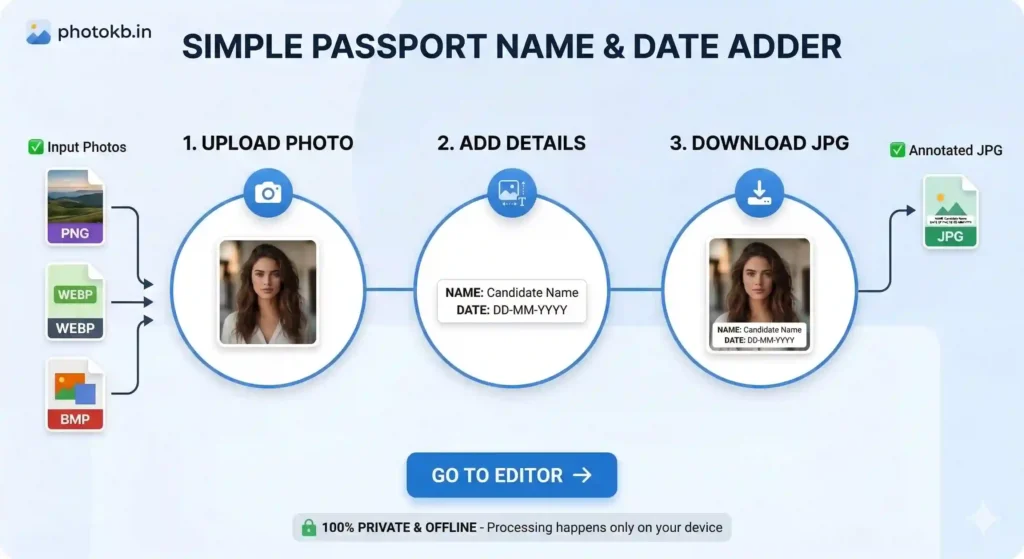
Image Metadata
When you add a name and date to a photo, you aren’t just adding pixels; you are changing the Image Metadata. Many online “free” tools strip away the resolution data, making the photo look “soft” or blurry.
At PhotoKB, we maintain a 300 DPI (Dots Per Inch) standard during the text-injection process. By using a solid white strip at the bottom, we prevent the “transparency artifacts” that usually occur when saving small JPG files. This technical precision is why students from every corner of India trust PhotoKB.in for their career-defining applications.
Common Mistakes to Avoid (Checklist)
- Cap and Goggles: Never wear a hat, cap, or dark sunglasses. These result in 100% rejection.
- The “Selfie” Trap: Do not use a selfie. The wide-angle lens of a front camera distorts facial features. Ask a friend to take a photo from at least 4 feet away.
- Neutral Expression: Do not smile excessively or frown. A neutral face with both ears visible is the official requirement.
- White Background: While some exams allow light colors, a plain white background is the safest choice for all Indian government exams.
The Technical Edge: Why Offline Processing Matters
In an era of rising data misuse, your personal photograph is sensitive data. Most websites that offer “Name and Date on Photo” services upload your image to their database. PhotoKB.in is different.
Our tool runs on Advanced JavaScript. When you “upload” a photo, it only moves from your storage to your browser’s memory. The conversion happens on your device, not our server. This makes the tool:
- Instant: No waiting for a server to process the request.
- Secure: Your face and name are never stored on any external cloud.
- Efficient: It works even on low-speed internet connections once the page is loaded.
Frequently Asked Questions
Q: Which date should I put on the photo?
A: You must put the Date of Photo (DOP), the day you actually took the picture. Do not put your Date of Birth (DOB). Putting your birthday instead of the photo date is a common mistake that leads to form rejection.
Q: Can I use this for Railway (RRB) exams?
A: Yes. Railway Recruitment Board (RRB) NTPC and Group D exams also accept this format. The white strip with the name and date is universally accepted across most Indian government forms.
Q: Does this tool reduce the image quality?
A: No. We overlay the text on your original image. However, if your original photo is very large (e.g., 5MB), we automatically compress it to a web-friendly size so you can upload it easily.
Q: Is it safe to upload my photo here?
A: Absolutely. This tool runs locally in your browser. Your personal photo is edited on your device and is never sent to or stored on our servers.