
When applying for elite national competitive exams like the UPSC (Union Public Service Commission) or NEET (National Eligibility cum Entrance Test), the technical specifications of your application are just as important as your exam preparation. Every year, thousands of aspirants face the heartbreak of seeing their applications rejected not because of a lack of merit, but due to simple errors in their uploaded photographs.
Two specific requirements now dominate these application portals: the “3/4th face coverage” (75%) rule and the strict “Direct Camera Alignment” mandate. This guide provides an expert deep dive into these specifications to ensure your application is portal-ready on the first try.
1. Decoding the 3/4th (75%) Face Coverage Rule
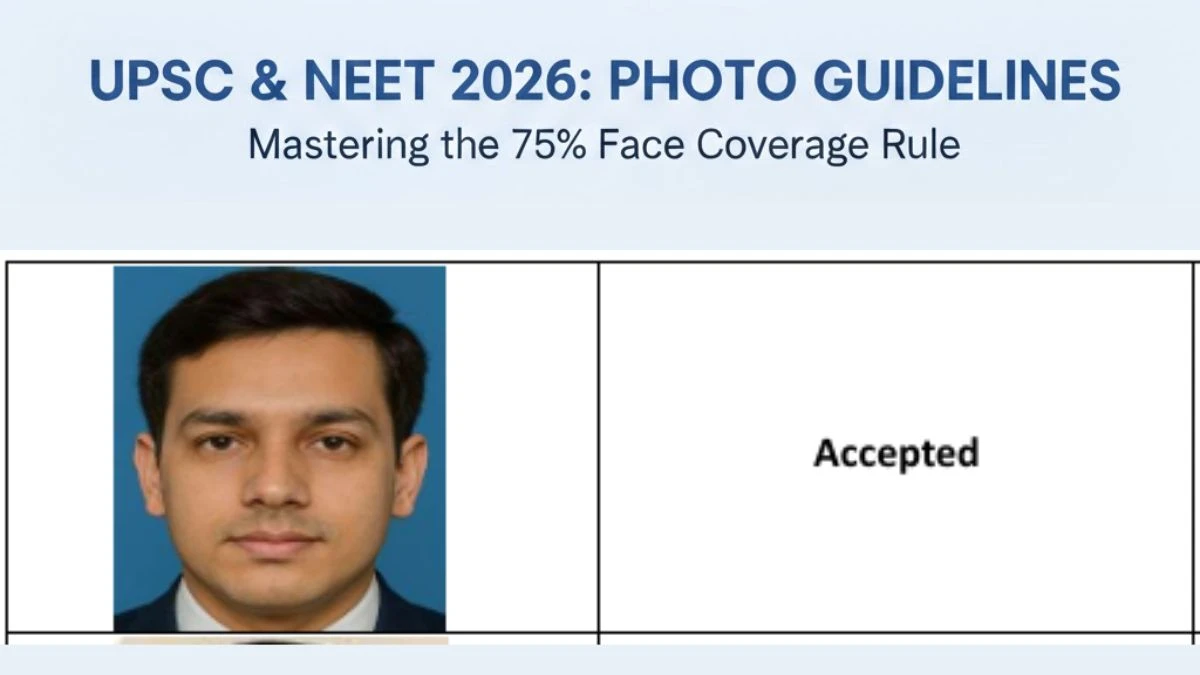
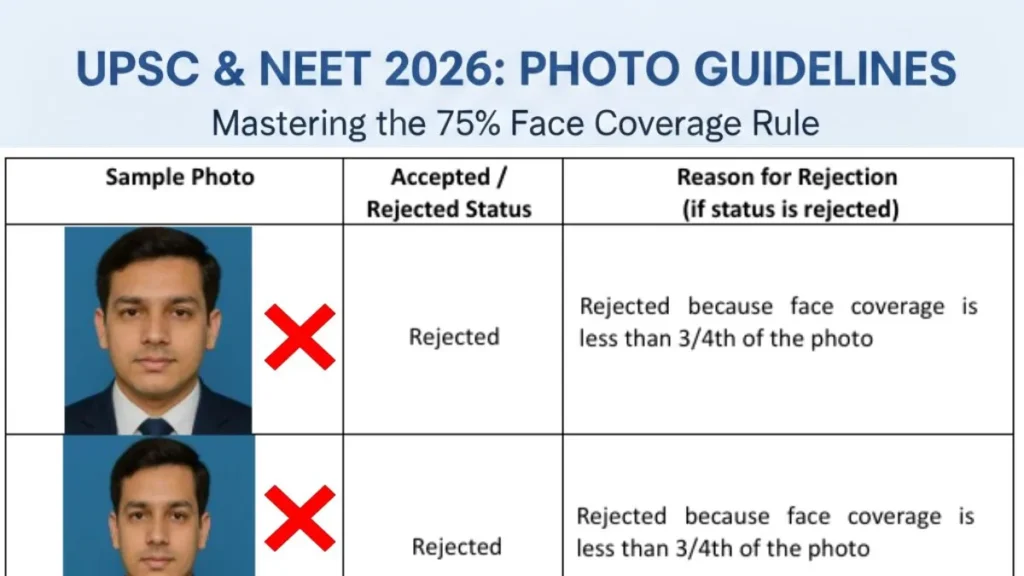
In recent updates to portal instructions, the UPSC has made it mandatory that the candidate’s face must cover at least 75% or three-fourths of the total photo area.
Why is this required?
The primary goal of this requirement is identification and security. Large-scale examinations use facial recognition software and manual verification to match your application photo with a “Live Photograph” captured during the registration process. If your face is too small in the frame (e.g., a full-body or long-distance shot), the system cannot detect enough biometric points to verify your identity, leading to an automatic mismatch.
What “75% Coverage” Looks Like
- The Proportions: Your head, from the top of your hair to the bottom of your chin, should occupy the vast majority of the vertical space in the JPG file.
- The Framing: Only a small portion of your shoulders should be visible at the bottom.
- Common Error: Many students upload “standard” passport photos where the torso takes up 50% of the frame. Under the new UPSC guidelines, these are strictly rejected because the face coverage is insufficient.
2. The “Direct Look” and Facial Alignment Mandate
It isn’t enough for your face to be large; it must also be perfectly aligned. The NTA and UPSC both emphasize that the candidate must be looking directly into the camera lens.
Key Alignment Requirements:
- Frontal View: Your full face must be visible in a frontal view, with the head positioned exactly in the center of the frame.
- The “Ear Lobe” Rule: Both ear lobes must be visible and clear. This acts as a secondary check to ensure your head isn’t tilted or turned to one side.
- Direct Gaze: Your eyes must be open and looking straight ahead. Averted gazes, “side-profile” looks, or tilted heads are cited as primary reasons for rejection.
3. Technical Specifications: Size, Format, and Quality
To successfully upload your photo to a portal like PhotoKB or the official exam sites, you must meet these underlying technical “Dos and Don’ts”:
| Specification | UPSC Requirements | NEET (NTA) Requirements |
| File Format | JPG only | JPG/JPEG |
| File Size | 20KB to 200KB | 10KB to 200KB (Passport) |
| Filename | Must be saved as ‘photo’ | Not specified |
| Background | Plain white | White background |
| Postcard Size | N/A | 4″x6″ (50KB to 300KB) |
4. Critical “Don’ts” to Prevent Rejection
Based on official NTA and UPSC “Reject” samples, avoid the following at all costs:
- Masks and Face Coverings: Photos taken with masks are strictly prohibited and will lead to the cancellation of candidature.
- Caps and Goggles: Do not wear caps, hats, or dark sunglasses.
- Regular Spectacles: These are only allowed if you wear them daily. However, you must ensure there is no glare on the lenses and your eyes are fully visible.
- Dark Backgrounds: Portraits taken against colorful or dark backgrounds will be rejected. The background must be plain white.
- Uniforms: Avoid taking photos in professional or school uniforms; neutral clothing is preferred.
- Fabricated Images: Do not attempt to use “computer-generated,” “hand-made,” or “Polaroid” photos. These are flagged as “Unfair Means” (UFM), which can lead to a permanent ban from the examination.
5. The “Triple Signature” and Thumb Impression Rules
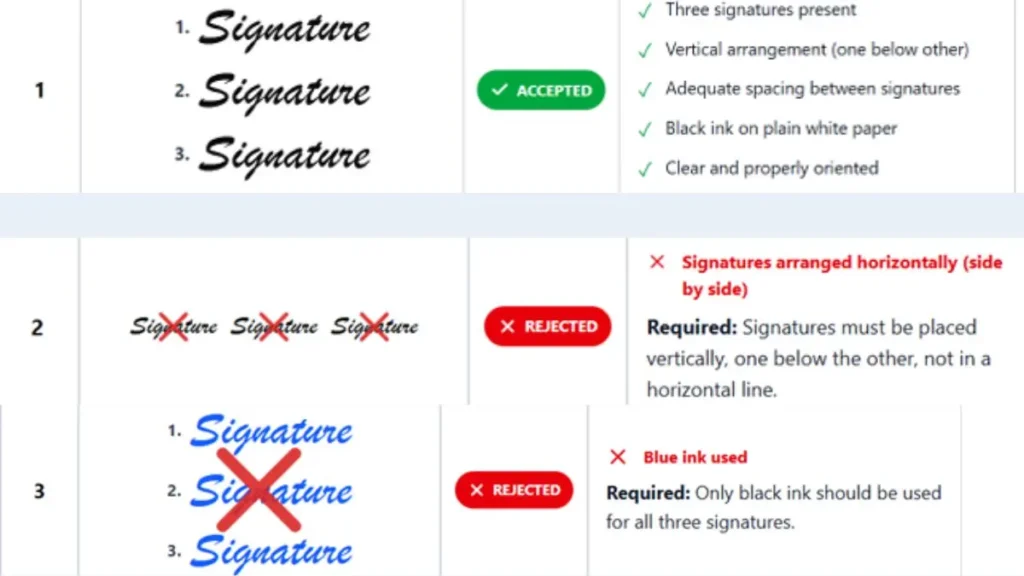
While this guide focuses on the face, the UPSC recently introduced a unique “Triple Signature” requirement.
- The Method: You must sign your name three times vertically (one below the other) on a single sheet of plain white paper.
- The Ink: You must use black ink only. Blue ink or colored paper will result in an immediate rejection.
- The File: The scanned image must contain all three signatures and be between 20KB and 100KB.
For NEET aspirants, the Left Hand Thumb Impression must be scanned in JPG format between 4KB and 30KB. If the left thumb is unavailable, the right hand may be used.
6. Step-by-Step Instructions for a Perfect Upload
To ensure your photo meets the 75% face coverage and direct gaze requirements, follow this workflow:
- Step 1: Lighting and Background: Find a room with bright, natural light. Stand directly in front of a plain white wall. Ensure there are no shadows on your face or the wall behind you.
- Step 2: Positioning: Keep your shoulders level. Look directly at the camera lens, not at the screen. Make sure both ears are visible and your expression is natural (no frowning or grinning).
- Step 3: Capturing the Shot: Take a high-resolution photo. Ensure your hair does not cover your eyes.
- Step 4: The 75% Crop: Use an image editor to crop the photo tightly. The face should occupy the space from nearly the top edge to nearly the bottom edge of the frame.
- Step 5: Final Check: Verify the file size is between 20KB and 200KB. Save the file as
photo.jpg(specifically for UPSC).
Conclusion: Attention to Detail is Key
The UPSC and NEET application processes are designed to be rigorous from the very first click. Specifications like 75% face coverage and vertical triple signatures are not mere suggestions; they are mandatory protocols to ensure the integrity of the national examination system.
By following the rules for clear contrast, white backgrounds, and direct alignment, you protect your candidature from unnecessary rejection. Always visit the official websites (www.nta.ac.in or www.upsc.gov.in) for the most current updates before submitting your final form.
Reference- UNION PUBLIC SERVICE COMMISSION