
Don’t Let a JPEG Error Ruin Your Career.
Every year, the Staff Selection Commission (SSC) conducts some of the biggest government recruitment exams in India, including CGL (Combined Graduate Level), CHSL (Combined Higher Secondary Level), MTS (Multi-Tasking Staff), and GD Constable. Millions of aspirants study day and night for these opportunities.
However, every year, a heartbreaking reality unfolds just weeks before the exam. The SSC releases a “Rejection List”, a list of candidates whose application forms have been cancelled. The reason? It wasn’t their marks, their age, or their qualifications. It was their Photograph.
Thousands of eligible candidates are disqualified simply because their uploaded photo had a blurry background, they were wearing glasses, or the file size was incorrect.
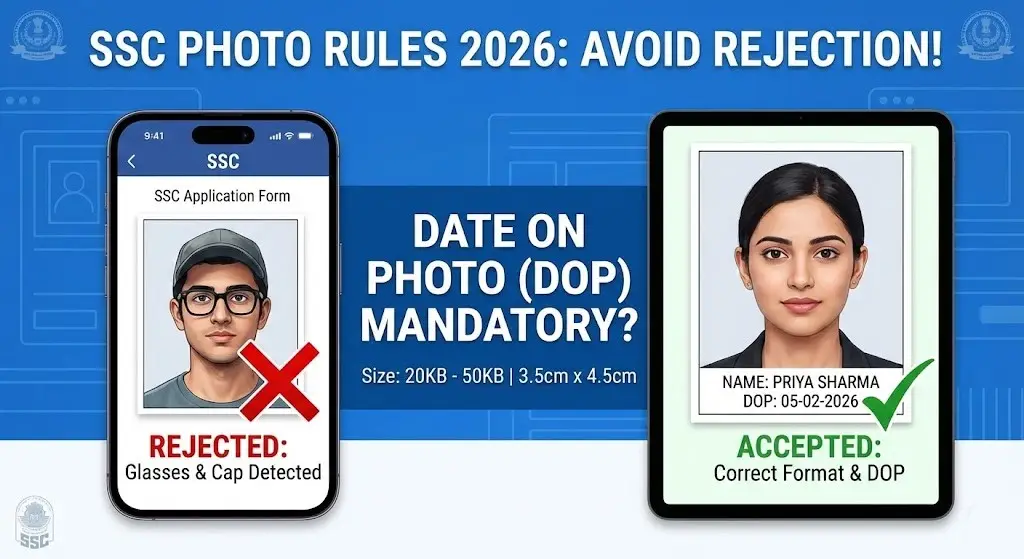
The most confusing rule for students in the 2025-2026 cycle remains: “Do I need to print the Date on my Photo (DOP)?”
In this comprehensive guide, we will break down every single photo and signature requirement for the SSC 2026 exams. We will explain the official rules, debunk common myths, and show you exactly how to format your documents to ensure your application is 100% safe.
1. The “Date on Photo” (DOP) Confusion: Is it Mandatory?
This is the most frequently asked question by aspirants. The confusion stems from the fact that SSC has changed its rules multiple times over the last few years.
The History of the Rule
In previous years (specifically around 2020-2022), the official SSC notification explicitly stated in bold letters:
“The date on which the photograph has been taken should be clearly printed on the photograph. Applications without the date printed on the photograph will be rejected.”
This led to a massive wave of rejections for students who missed this small detail.
The 2026 Status
In recent notifications (late 2024 and 2025), the explicit mention of “mandatory rejection” for missing dates has been relaxed in some specific exam notifications. However, the requirement for a recent photograph (not older than 3 months) remains strict.
Why You Should Still Add the Date (The Safe Strategy)
Even if the latest notification for a specific post (like Selection Posts) doesn’t explicitly demand it, adding the Date of Photo (DOP) remains the safest strategy for three reasons:
- Proof of Recency: The SSC rule states your photo must not be older than three months. Printing the date is the easiest way to prove this to the commission.
- Invigilator Discretion: On exam day, the invigilator at the center compares your face with the admit card photo. If you upload an old photo without a date, and your appearance has changed slightly (beard, weight, hairstyle), they may suspect impersonation. A printed date helps validate that the photo is current.
- Zero Risk: There is no penalty for having a date on your photo. However, there is a potential risk for not having it. In government exams, it is always better to be safe than sorry.
The Fix: You don’t need to go to a studio or learn Photoshop. You can use a specialized SSC Name & Date Generator to automatically add a white strip with your name and the current date to the bottom of your photo.
2. Spectacles and Caps: The Big “No” (Top Rejection Reason)
If you ignore everything else in this article, please pay attention to this section. This is the #1 reason for form rejection in the 2025-26 cycle.
The “No Glasses” Rule
Many students wear prescription spectacles (chashma) every day. They assume that since they wear glasses in real life, their ID photo should also have glasses. This is a fatal mistake.
- The Problem: When a camera flash hits the lenses of your glasses, it creates a “glare” or white reflection. This reflection hides your eyes.
- The Consequence: The SSC uses computerized software to scan applications. If the software cannot detect your irises (eyes) clearly due to glare, it automatically rejects the photo.
- The Rule: You MUST remove your glasses for the photo. Even if you cannot see without them, take them off for those 5 seconds while the photo is clicked.
No Caps, Hats, or Accessories
- Headgear: Caps, hats, and fashion accessories are strictly prohibited.
- Religious Headgear: If you wear religious headgear (like a Turban or Hijab), it is allowed, but it must not cover your face. Your entire face, from the top of the forehead to the bottom of the chin, must be visible.
- Ears Visible: Both ears must be clearly visible in the photo. Do not let long hair cover the sides of your face.
3. Technical Dimensions Checklist (Size Matters)
The SSC server infrastructure is quite old. It cannot handle large files or unusual formats. If your file is even 1KB too large or too small, the upload button simply won’t work, or worse, it will upload but fail validation later.
Here is the strict technical checklist for 2026:
| Requirement | Official SSC Specification | Important Notes |
| File Size | 20 KB to 50 KB | Files < 20KB are rejected as “Blurry”. Files > 50KB fail to upload. |
| Dimensions | 3.5 cm (Width) x 4.5 cm (Height) | This equates to roughly 132 x 170 pixels, but aspect ratio is key. |
| Format | JPEG or JPG | PNG or PDF files are not accepted. |
| Background | Plain White or Light Color | No dark walls, no outdoor scenery, no selfies with cluttered rooms. |
| Resolution | 100 DPI minimum | Ensure the face covers 70-80% of the frame. |
How to Achieve This?
Most mobile cameras take photos that are 2MB to 5MB in size. Simply cropping them often results in a file that is still 500KB (too big).
- Do not just rename the file.
- Do not use WhatsApp to compress (it reduces quality too much).
- Use a dedicated online compression tool like Compress Image to 20KB to keep the quality high while meeting the file size limit.
4. The “Blurry Signature” Mistake
While candidates spend hours worrying about their photo, they often ignore the signature. However, a blurry or invisible signature is the second most common cause of rejection.
The Signature Rules:
- File Size: 10 KB to 20 KB.
- Dimensions: 4.0 cm (Width) x 2.0 cm (Height).
- Ink Color: Sign on white paper with a Black Ink Pen. (Blue ink is sometimes accepted, but Black offers the best contrast for scanning).
The Common Problem
The 10KB – 20KB limit is extremely small. When students compress a photo of their signature to 12KB, it often becomes “pixelated” or blurry. If the SSC computer cannot “read” the signature strokes, it is marked as invalid.
Pro Tip: Use a scanner or a high-quality scanning app (like Adobe Scan) to capture the signature, then resize it using a specialised SSC Signature Resizer. Avoid taking a photo in low light.
5. Live Photo Capture (The New Challenge)
In some recent exams (like SSC CGL 2024-25), SSC has introduced a “Live Photo” feature where you have to capture a photo using your webcam or phone camera directly during the application process.
However, you are also required to upload a passport-size photo as a backup or for the admit card.
Tips for Live Photo Capture:
- Find Good Light: Sit facing a window. Light should fall on your face, not come from behind you.
- Plain Wall: Sit against a plain white or cream wall. A cluttered background (kitchen, bed, posters) can cause issues.
- Steady Hand: Ensure the camera is at eye level. Do not look down or up.
Summary: Your 5-Step Safety Plan
The SSC application process is not just a formality; it is the first test of your discipline and attention to detail. Do not let a small technical error destroy a year of hard work.
Follow this 5-Point Safety Plan before you hit “Submit”:
- Check the Specs: Ensure your Photo is 20KB-50KB and Signature is 10KB-20KB.
- Remove Accessories: No glasses. No caps. No masks.
- Add the Date: Use the Name & Date tool to add the DOP. It costs nothing and adds a layer of safety.
- Check the Preview: After uploading, look at the preview on the SSC portal. Is it blurry? Is it stretched? If yes, re-upload.
- No Selfies: Never, ever upload a casual selfie. Use a proper passport-style shot.
Don’t take risks with your career. Use verified tools to format your documents correctly. Good luck with your preparation!
Disclaimer: This guide is based on the general guidelines observed in SSC notifications up to 2025. Candidates are advised to always read the specific official notification for their exam (CGL, CHSL, GD, etc.) on ssc.gov.in before applying.
1 thought on “SSC Photo Requirements 2026: Date, Size and Rejection Rules”