
UTI PAN Photo And Signature Resizer
Resize photo (300 DPI) and signature (600 DPI) for UTIITSL PAN applications.
Click to Upload Image
UTI PAN Photo and Signature Resizer: Applying for a new Permanent Account Number (PAN) or making corrections to an existing one through the UTIITSL (UTI Infrastructure Technology And Services Limited) portal is a major official task. You carefully fill out Form 49A, double-check all your details, and proceed to the document upload stage, only to be met with a frustrating red error message: “Invalid Image Dimensions” or “Image DPI is not 300.”
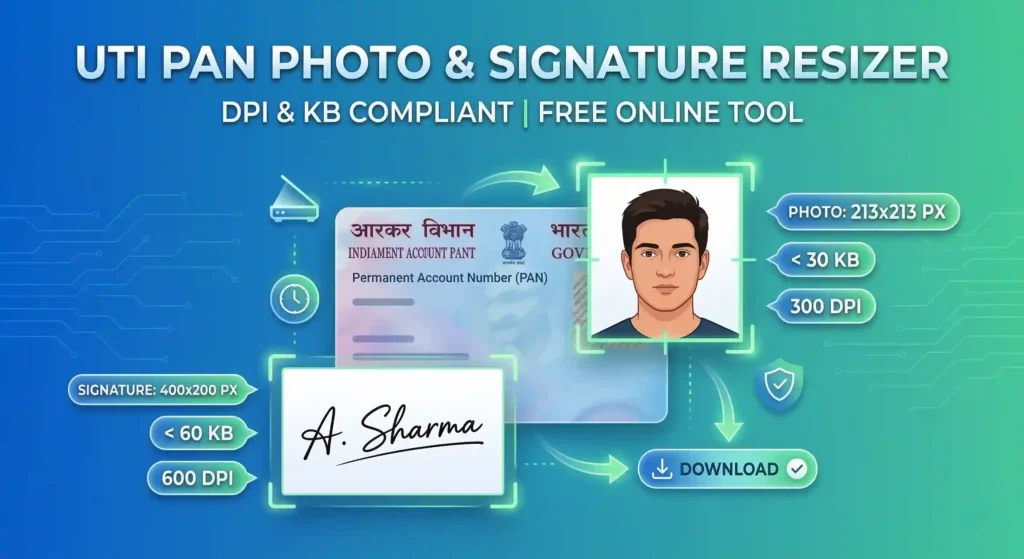
The UTIITSL portal enforces some of the most rigid document upload guidelines of any government website in India. Your photograph must be exactly 213×213 pixels, exactly 300 DPI, and under 30 KB. Simultaneously, your signature must be exactly 400×200 pixels, exactly 600 DPI, and under 60 KB.
If you try to use standard mobile apps or generic web cropping tools, you will likely fail. Why? Because most basic editors only change the file size and pixels, completely ignoring the invisible “DPI” (Dots Per Inch) metadata that the UTI portal specifically scans for.
That is exactly why we built the UTI PAN Photo and Signature Resizer. This free, highly specialised online tool not only crops and compresses your images to the precise KB limits, but it also physically injects the mandatory 300 DPI and 600 DPI metadata into your JPEG files, ensuring a 100% successful upload on your first try.
Official UTIITSL PAN Card Image Guidelines
To avoid application rejections and unnecessary delays in receiving your physical PAN card, you must adhere to the official rules set by the Income Tax Department and UTIITSL. Let’s break down exactly what the system requires.
1. UTI PAN Photo Guidelines
Your photograph is printed directly onto your physical PAN card, serving as a primary form of identification. Therefore, it must be pristine.
- Exact Dimensions: The digital image must be exactly 213 x 213 pixels.
- Physical Size Equivalent: This equates to a printed passport photo measuring 3.5 cm x 2.5 cm.
- Resolution (DPI): The image metadata must read strictly as 300 DPI (Dots Per Inch).
- File Size Limit: The total weight of the digital file must be less than 30 KB.
- Format: Only JPEG / JPG files are accepted. PNG or WebP files will trigger an error.
- Visual Appearance: The photo must be recent (taken within the last 6 months), clearly showing your face, neck, and shoulders. You must have a neutral expression, looking directly at the camera.
- Background: The background must be completely plain and white. Dark, busy, or outdoor backgrounds will lead to manual rejection.
2. UTI PAN Signature Guidelines
Your signature is equally important, as it is used to authorise financial transactions and verify your identity at banks.
- Exact Dimensions: The digital signature box must be exactly 400 x 200 pixels.
- Physical Size Equivalent: This translates to a physical box size of 2 cm x 4.5 cm.
- Resolution (DPI): The signature must be scanned at 600 DPI (Note: Some older UTI portal updates accepted 200 DPI, but 600 DPI is the safest and most current official standard for extreme clarity).
- File Size Limit: The file must be less than 60 KB.
- Format: Only JPEG / JPG formats are permitted.
- Visual Appearance: You must sign on a blank white piece of paper using black ink. Blue ink is often accepted, but black ink is highly recommended for the best scanning contrast. The signature must be properly centred within the box.
How to Use Our UTI PAN Photo and Signature Resizer
We have designed this tool to be incredibly user-friendly, allowing you to prepare your documents in under 60 seconds using just your smartphone or laptop.
Step 1: Select Your Document Type. Use the dropdown menu at the top of the tool to choose what you are working on. Select either “PAN Photo (213×213 px)” or “PAN Signature (400×200 px).” The cropping box will automatically adjust its aspect ratio to match your selection.
Step 2: Upload Your Image. Click the designated upload area to browse your device for your raw photo or signature scan.
Step 3: Frame and Crop. A dark overlay will appear over your image with a bright cropping square.
- For Photos: Drag the corners so your face is perfectly centred, with a bit of space above your head and your shoulders visible at the bottom.
- For Signatures: Drag the box to tightly frame your ink signature, ensuring there are no dark shadows or edges of the paper visible inside the box.
Step 4: Generate the Compliant File. Click the blue “Apply Crop & Resize” button. Instantly, our tool will resize the pixels, calculate the perfect compression to hit the <30KB or <60KB targets, and inject the critical DPI metadata.
Step 5: Verify and Download. A preview will appear showing the final size and the injected resolution details. Click “Download Document” to save the ready-to-upload JPEG file.
Your Privacy is Our Priority
We understand that you are uploading highly sensitive personal identification documents. We take your privacy seriously.
Our UTI Resizer tool utilises advanced HTML5 and JavaScript “client-side” processing. This means that when you upload your photo and signature, the image is loaded strictly into your device’s active memory (RAM).
Your images are never uploaded to our servers, we do not see them, and we do not store them. The entire cropping, DPI injection, and downloading process happens locally on your phone or computer. Once you close the browser tab, your data vanishes completely.
Frequently Asked Questions (FAQs)
What is the exact photo size required for the UTI PAN card upload?
The official requirement is a JPEG file measuring exactly 213 pixels in width by 213 pixels in height. The resolution must be set to 300 DPI, and the total file size must be less than 30 KB.
How do I change my photo to 300 DPI and my signature to 600 DPI?
You do not need expensive software like Photoshop. Simply upload your images to our free tool on this page. Our tool automatically injects the exact 300 DPI metadata into your photo and 600 DPI metadata into your signature during the download process.
Why is the UTI portal saying “Invalid Image Dimensions”?
This error occurs if your image is even one pixel off from the strict 213×213 or 400×200 guidelines, or if the DPI is standard web resolution (72/96 DPI) instead of the required print resolution. Use our tool to automatically correct both the pixels and the DPI.
How do I reduce my PAN photo size to under 30 KB without losing quality?
Our tool features an intelligent algorithmic compression loop. It automatically tests different JPEG compression levels in milliseconds until it hits a file size that is safely under 30 KB while preserving maximum facial clarity.
Can I use a blue pen for my PAN card signature?
While blue ink is sometimes accepted, official UTIITSL guidelines strongly prefer and recommend black ink on white paper. Black ink provides superior contrast when scanned at 600 DPI, ensuring your signature is clearly printed on the physical PAN card.
Do these dimensions work for the NSDL (Protean) PAN portal as well?
While NSDL and UTIITSL issue the same PAN cards, their upload portals have slightly different backend requirements. NSDL generally accepts slightly larger dimensional variations. However, images processed through this UTI tool are highly optimized and generally pass NSDL portal checks as well.